
5R Game APK Download New Earning App in Pakistan 2026
How to install 5R Game APK Download New Earning App in Pakistan 2026 APK?
1. Tap the downloaded 5R Game APK Download New Earning App in Pakistan 2026 APK file.
2. Touch install.
3. Follow the steps on the screen.
Description
Online gaming has become a popular form of digital entertainment, especially for people who prefer using smartphones. Instead of downloading many separate games, users often look for platforms that provide several gaming options in one place. 5R Game is presented as a mobile-oriented gaming platform that users can explore through compatible devices.
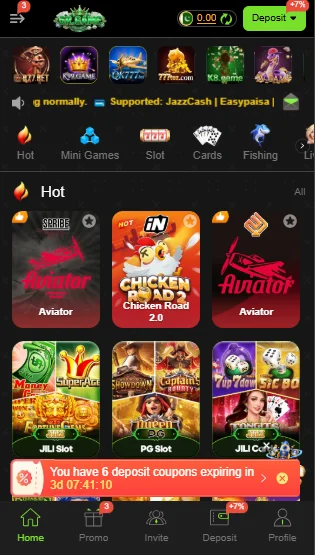
The platform focuses on convenient access, simple navigation, account registration, and different online gaming options. Android users may also look for the 5R Game APK when they want to access the platform through a mobile application.
Understanding 5R Game
5R Game is an online gaming platform designed around mobile users. Its purpose is to bring different types of games and entertainment features together under one platform.
Rather than relying on a single game, users may find multiple categories and gaming options depending on the current version of the platform.
The available games and features can change with updates. Therefore, users should always check the latest information provided through the official platform before downloading an application or using account-related services.
Why Users Look for 5R Game
There are several reasons people search for online gaming platforms like 5R Game.
The first is convenience. Smartphones allow users to access online services without sitting in front of a desktop computer. The second is variety. A platform with different games gives users more choices and allows them to explore different styles of gameplay.
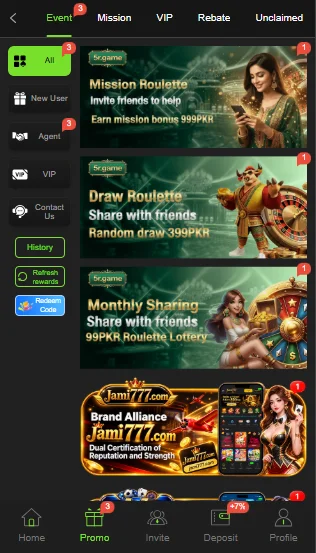
Another factor is accessibility. A mobile-focused platform can be easier for beginners because most of the important functions can be accessed directly from a smartphone.
However, convenience should not mean ignoring security. Users should always verify the platform before providing personal information or downloading an application.
5R Game Features
The exact features offered by 5R Game may depend on the current version. Some of the commonly expected features of an online gaming platform include the following.
Mobile Access
5R Game is designed with smartphone users in mind. A mobile-friendly interface can make it easier to browse games and account sections.
Multiple Gaming Choices
Users may find different categories of games depending on what is currently available. This variety can make the platform more interesting for people who do not want to play only one type of game.
User Accounts
An account allows users to access platform features and maintain their own login information.
Simple Navigation
A straightforward interface can help users find different sections without having to learn complicated controls.
Android Support
If an official Android application is provided, users may be able to access the platform through an APK or application.
Creating a 5R Game Account
New users normally need to register before using account-based features. The registration process may change depending on the platform’s latest design, but it generally follows a few basic steps.
Open the Official Website
Start by accessing the current official 5R Game platform.
Check the website address carefully before entering any information. This is important because unofficial websites can sometimes use similar names.
Find the Registration Option
Look for a button such as Register, Sign Up, or Create Account. Select the appropriate option to open the registration form.
Provide the Required Details
The registration form may ask for information such as a username, mobile number, password, or other required details. Make sure the information is entered correctly.
Set a Strong Password
Create a password that is difficult for other people to guess. Avoid using obvious information such as your name, phone number, or simple number combinations.
Complete Verification
If the platform requires account verification, complete the available process. Once registration is successful, keep your login information somewhere secure.
5R Game Login
- Existing users can normally access their account through the login page.
- Enter the registered account information and password in the appropriate fields.
- If you forget your password, use the official recovery option if it is available.
Do not repeatedly enter random passwords, and never send your password to another person claiming they can recover your account.
5R Game APK
The 5R Game APK may be searched for by Android users who prefer using a mobile application.
APK stands for Android Package Kit, which is the standard file format used for installing Android applications.
However, users should be careful when searching for APK files online. Not every website offering a file with the 5R Game name is necessarily connected to the original platform.
Before downloading an APK, check:
- The source of the file
- Application name
- Developer information
- Version information
- Requested permissions
- Website address
- Android security warnings
Avoid modified, cracked, or unknown APK files.
How to Install 5R Game APK
- If an official APK is available, download it from a trusted source.
- After downloading the file, open it and follow the Android installation instructions.
- If your phone displays a warning about an unknown application, stop and verify the source before continuing.
- After installation, open the application and check its details.
It is also a good idea to keep your Android operating system updated because security updates can help protect your device.
Exploring the 5R Game Interface
When a user opens a gaming platform for the first time, the interface may contain several different sections.
The homepage generally provides access to featured or popular games. Other sections may contain account information, game categories, promotions, support, or settings.
New users should spend some time exploring the interface before using any paid feature. Understanding where different functions are located can make the experience easier and reduce mistakes.
Types of Games
The selection available on 5R Game can depend on the current platform version.
Online gaming platforms may include different categories such as:
- Arcade-style games
- Card games
- Casual games
- Number-based games
- Interactive games
- Other mobile entertainment options
Not every game will be suitable for every user. The best approach is to read the rules and instructions of an individual game before starting.
Mobile Gaming Performance
A smooth gaming experience depends on more than the platform itself. Your smartphone’s performance, available storage, internet connection, and application version can all affect gameplay. If a game loads slowly, first check your internet connection.
You can also close unnecessary applications running in the background. If your phone has very little free storage, removing unnecessary files may improve general performance.
For users experiencing repeated connection problems, switching between Wi-Fi and mobile data can help identify whether the issue is related to the internet connection.
5R Game and Real Money Features
Some online gaming platforms include features involving deposits, withdrawals, rewards, or real-money gameplay. If 5R Game provides any such features, users should understand the risks before using them. Online gaming does not provide guaranteed income. Results can be uncertain, and users can lose money.
Before making a deposit, carefully review the available terms and conditions. Pay attention to minimum deposits, withdrawal requirements, transaction charges, and any other applicable rules.
Never assume that a promotional message or advertisement means that a particular amount of money is guaranteed.
Responsible Gaming Matters
Responsible gaming means keeping control over your gaming activity. If you are using a platform for entertainment, decide how much time you want to spend before starting. If money is involved, set a spending limit and stay within that limit.
Do not chase losses by continuing to spend money in an attempt to recover an earlier loss. It is also important not to borrow money for online gaming. Gaming should remain an activity that fits comfortably within your personal budget and daily routine.
Protecting Your 5R Game Account
Account security is an important part of using any online platform.
A strong password is the first step. Make sure your password is unique and is not used on multiple websites. Do not share your password with friends, strangers, or people contacting you online. Verification codes should also remain private.
If someone asks for an OTP or login code, do not provide it unless you have independently confirmed that the request is legitimate.
Avoiding Fake 5R Game Links
Users should be especially careful when searching for gaming websites through social media or random search results. A fake website may copy the logo, colors, or name of a real platform. Before logging in, check the address carefully.
Avoid clicking suspicious links that promise:
- Guaranteed winnings
- Unlimited bonuses
- Free balances
- Special account upgrades
- Guaranteed income
Such claims should be treated carefully.
What Beginners Should Do First
If you are new to 5R Game, start slowly.
- First, learn how the website or application works.
- Next, explore the available games.
- Read the rules of any game before playing.
- If the platform offers financial features, understand their terms before making a transaction.
There is no need to rush into every available feature. Taking a few minutes to understand the platform can help prevent unnecessary mistakes.
Common 5R Game Problems
Users of online gaming platforms can sometimes experience technical problems.
These may include:
Login Issues
Incorrect login information is one of the most common reasons users cannot access an account.
Slow Loading
A weak internet connection or server-side issue can cause slow loading.
Application Errors
An outdated or incorrectly installed APK may cause an application to crash.
Verification Problems
Incorrect account information can sometimes create verification difficulties.
Connection Drops
Unstable Wi-Fi or mobile data can interrupt online gameplay. For technical problems, use the platform’s official support option rather than downloading random applications that claim to repair the problem.
Keeping Your Phone Safe
The security of your gaming account also depends on the security of your phone.
Use a screen lock and avoid installing applications from unknown sources. Keep your operating system updated. Review application permissions when installing new software. If an application requests permissions that appear unrelated to its purpose, investigate before allowing access.
Avoid storing passwords in unsecured notes or sharing them through public messages.
Advantages of Mobile Gaming
Mobile gaming provides several practical benefits.
- The first is portability. A smartphone can be carried almost anywhere.
- The second is convenience. Users can open games without setting up a computer.
- The third is variety. Online platforms can offer multiple gaming categories.
- Another benefit is that mobile games can fit into short periods of free time.
At the same time, users should maintain a healthy balance between gaming and everyday responsibilities.
Tips for a Better 5R Game Experience
- For a smoother experience, keep your phone updated and maintain enough free storage.
- Use a reliable internet connection and close unnecessary background applications.
- Keep your account information private.
- Always download applications from trusted sources.
- Read game rules before playing.
- If money-related features are available, understand the risks and set a personal budget.
- These simple habits can make online gaming safer and more controlled.
Frequently Asked Questions About 5R Game
What is 5R Game?
5R Game is an online gaming platform designed for users who want to access different gaming and entertainment options through mobile devices.
Can I use 5R Game on Android?
If an official Android application is currently available, users may be able to access the platform through an Android device.
What is the 5R Game APK?
The 5R Game APK refers to an Android application package that can be used to install the platform on compatible Android devices.
How can I register?
Open the official platform, select the registration option, provide the required details, and complete any verification steps.
How do I log in?
Registered users can normally access the login section and enter their account credentials.
Does 5R Game guarantee earnings?
Users should not assume that online gaming guarantees income. If real-money features are offered, financial losses are possible.
How can I stay safe?
Use a strong password, avoid suspicious links, protect verification codes, and download applications only from trusted sources.
Final Thoughts
5R Game is a mobile-oriented online gaming platform that users may explore for different types of digital entertainment. Its mobile approach can make it convenient for people who prefer accessing games through smartphones.
For new users, the most important things are understanding the platform, checking the official source, protecting account information, and reading the rules before using different features.
If an APK is available, verify its source before installation. Avoid modified applications and suspicious websites that use the 5R Game name.
Related apps








Trending Games
-
 2GO Game APK (Earning Real Money) Free Download 2026v1.5 2GO Game
-
 PKCasino Game Download New Earning Platform in Pakistan 2026v1.0 PKCasino
-
 222RS Game APK (Earn Real Money) Free Download 2026v3.9 222RS Game
-
 PAK LOYAL Game APK Download Earn Real Cash 2026v8.1 PAK LOYAL
-
 E98 Game APK (Latest Version v1.0) Free Download For Pakistanv3.9 E98 Game
-